
Database migrations
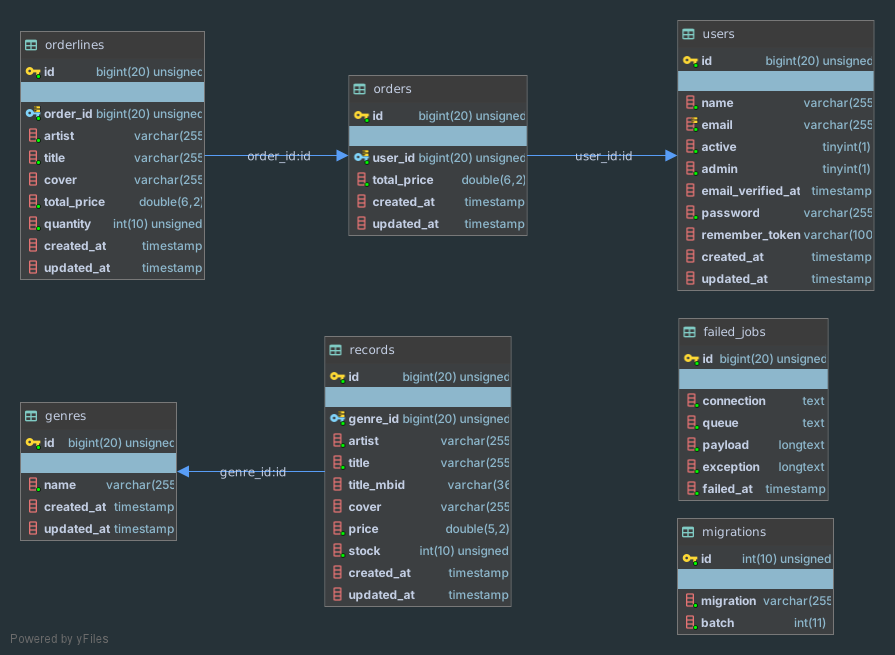
- For our Vinyl Shop application, we need five database tables: users, (music) genres, records, orders and orderlines
Create a new database
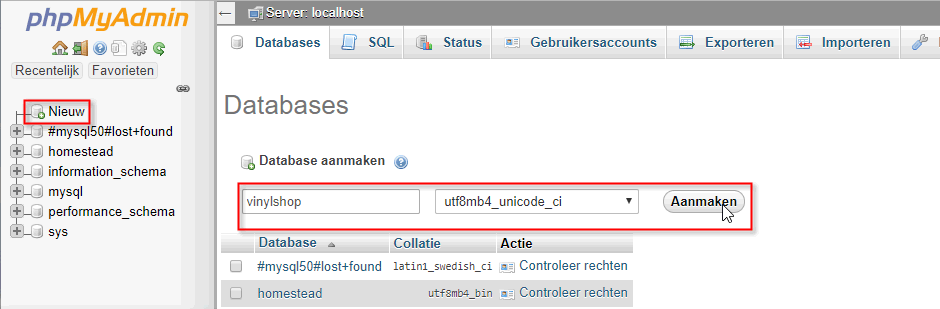
- First you have to create a new database (with name vinylshop) in phpMyAdmin
- Open http://homestead.test/phpMyAdmin/
- Add a new database vinylshop with utf8mb4_unicode_ci collation
Database backups
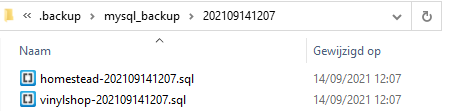
- Homestead can automatically backup your database when your Vagrant box is destroyed
- To enable automatic database backups, add the following lines to your Homestead.yaml file:
---
ip: "192.168.10.10"
memory: 2048
cpus: 2
provider: virtualbox
backup: true

...
databases:
  - homestead
  - vinylshop
1
2
3
4
5
6
7
8
9
10
11 - Once configured, Homestead will export your databases to the C:\vagrant\homestead.backup\mysql_backup directory when the
vagrant destroycommand is executed
Configure the database in .env file
- Open the file .env and change the database configuration
DB_CONNECTION=mysql
DB_HOST=localhost           # change to localhost, try 127.0.0.1 or 192.168.10.10 if localhost doesn't work
DB_PORT=33060               # add a zero or change to 2200 (see remarks)
DB_DATABASE=vinylshop       # change to vinylshop
DB_USERNAME=homestead       # change to homestead
DB_PASSWORD=secret          # change to secret
1
2
3
4
5
6
2
3
4
5
6
REMARKS
- Open a new terminal window in C:\vagrant\homestead and check whether your database is running at port 33060 or at port 2200 with the command
vagrant port.
(Or use option 4 on homestead.bat)
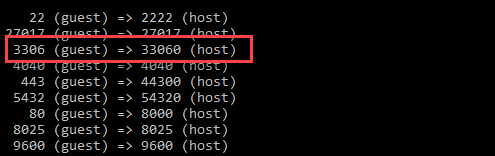
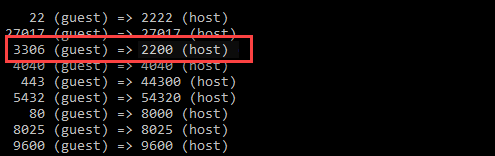
- Optional: if the port is mapped to 2200, it is likely that you already have the MySQL service running in the background.
- Open services (via the Windows button in your task bar) and set the "Opstarttype" of this service to "Handmatig" (by right clicking on it and choosing "Eigenschappen") and restart homestead.
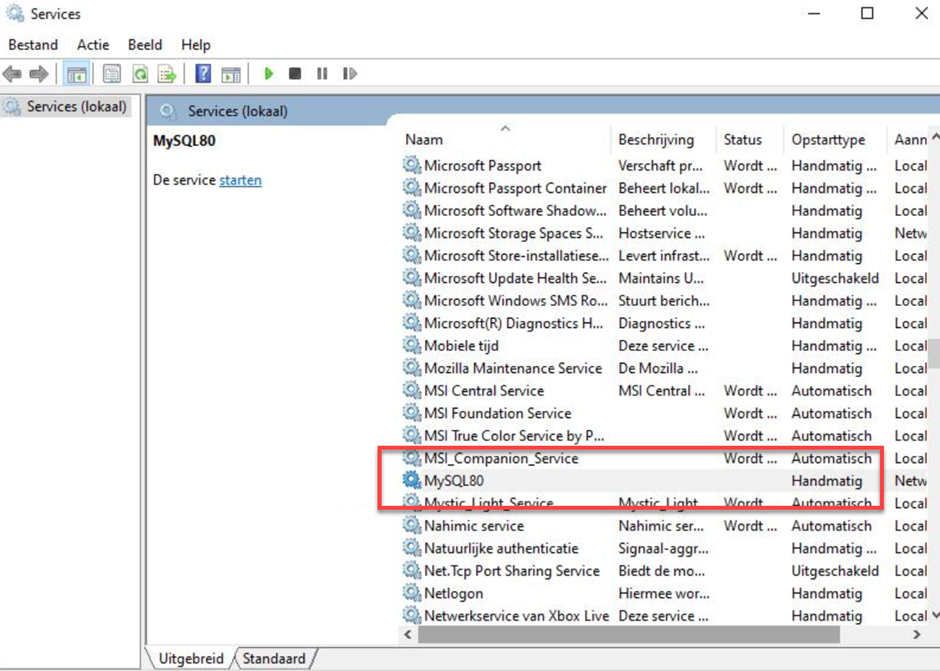
- Open services (via the Windows button in your task bar) and set the "Opstarttype" of this service to "Handmatig" (by right clicking on it and choosing "Eigenschappen") and restart homestead.
Creating the models and migrations
- Laravel represents the structure of the database tables (and the changes to it) as migrations
- Advantages
- Especially efficient if you code in a team
- If you change a table, you don't have to manually implement these changes in every database instance (every developer's local database, the production database, ...), but you can adjust or migrate it automatically
- All database migrations live inside the folder database/migrations
- Advantages
- By default, Laravel has three migrations
- 2014_10_12_000000_create_users_table.php for the users table
- 2014_10_12_100000_create_password_resets_table.php for resetting your login password (used later in this course)
- 2019_08_19_000000_create_failed_jobs_table for failed jobs (we don't use jobs in this course)
- A new migration (class) can be made with
php artisan make:migration(e.g.php artisan make:migration create_genres_table), but it's more interesting to create an Eloquent model together with the migration (e.g.php artisan make:model Genre -m)- With the second option, less mistakes against the Laravel (naming) conventions will be made
- In Laravel, each database table needs a corresponding model class to interact (query data, insert new records, ...) with that table
- The models are located in the root of the app folder
- Create all necessary models with the corresponding migrations (with the flag
-mor--migration)- You don't have to make a User model, as this model is already present by default
php artisan make:model Genre -m
php artisan make:model Record -m
php artisan make:model Order -m
php artisan make:model Orderline -m
1
2
3
4
2
3
4
WARNING
- Pay special attention to the links between the database tables in our database, as they determine the order of creating the models/migrations
- A record belongs to (has a) a certain genre. So FIRST create the Genre model (and migration) and THEN create the Record model (and migration), otherwise you can't link the foreign key (see below)
- Likewise for the Orderline model (and migration), which has to be created AFTER the Order model (and migration)
NAMING CONVENTIONS
- The name of a model is always singular and starts with a capital letter (e.g.
Record) - The name of the corresponding database table is always lower cased and plural (e.g. records)
- In the remainder of this course section we only look at the tables (the migrations). The next section deals with the related models.
Modify the tables
- Every migration class has two methods
up()for running a migrationdown()for rolling back a migration
- We only have to modify (extend) the
up()method with the necessary columns/fields
NAMING CONVENTIONS
- Use (lower cased) snake_case notation for the column names
- Use
idas the primary key - Use the model name (not the table name!) with the extension
_idas a foreign key- E.g.
user_idand notusers_id
- E.g.
Users table
- Open database/migrations/2014_10_12_000000_create_users_table.php
- A new database table is created with the
create()method (on theSchemafacade). Thecreate()method accepts two arguments: the first is the name of the table, while the second is a function (which in turn receives aBlueprintobject as a parameter) that may be used to define the new table. - Several columns (of which the purpose will become clear later on in this course) are automatically provided by Laravel
- The
id()method call adds an auto-incremented, unsigned BIGINT columnidfor the primary key
Remark:id()is a shorthand forbigIncrements('id') - The STRING column
emailmust have a unique value - The TIMESTAMP column
email_verified_atmay contain the valuenull - The method
timestamps()inserts two nullable TIMESTAMP columns (created_atandupdated_at) that will be used by Laravel to keep track of the changes to a database row/record
- The
- Add a BOOLEAN column
activewith default valuetrueand a BOOLEAN columnadminwith default valuefalse
- A new database table is created with the
public function up()
{
    Schema::create('users', function (Blueprint $table) {
        $table->id();     // shorthand for $table->bigIncrements('id');
        $table->string('name');
        $table->string('email')->unique();
        $table->boolean('active')->default(true);
        $table->boolean('admin')->default(false);
        $table->timestamp('email_verified_at')->nullable();
        $table->string('password');
        $table->rememberToken();
        $table->timestamps();
    });
}
1
2
3
4
5
6
7
8
9
10
11
12
13
14
2
3
4
5
6
7
8
9
10
11
12
13
14
Genres table
- Open database/migrations/yyyy_mm_dd_hhmmss_create_genres_table.php and add the necessary column
public function up()
{
    Schema::create('genres', function (Blueprint $table) {
        $table->id();
        $table->string('name');
        $table->timestamps();
    });
}
1
2
3
4
5
6
7
8
2
3
4
5
6
7
8
Records table
- Open database/migrations/yyyy_mm_dd_hhmmss_create_records_table.php and add the necessary columns and foreign key relation
- The
$table->foreignId('genre_id')method call is a shorthand for$table->unsignedBigInteger('genre_id'). Note that$table->unsignedInteger('genre_id')would result in an error as the sizes ofgenre_id(from the table records) andid(from the table genres) should correspond! - Later on in this application, we will retrieve some additional record information (e.g. the cover image and the track list) from MusicBrainz, a music encyclopedia with lots of music metadata.
Therefore, we store the MusicBrainz title id (of a record) in the column
title_mbid(a column of 36 characters). - The foreign key relation
cascadespecifies that- if a row from the genres table is deleted, all the rows in the records table referencing this genre are deleted as well
- if an
idin the genres table is updated, all the corresponding foreign keys in the records table are updated as well
- The
public function up()
{
    Schema::create('records', function (Blueprint $table) {
        $table->id();
        $table->foreignId('genre_id');    // shorthand for $table->unsignedBigInteger('id');
        $table->string('artist');
        $table->string('title');
        $table->string('title_mbid', 36)->nullable();
        $table->string('cover')->nullable();
        $table->float('price', 5, 2)->default(19.99);
        $table->unsignedInteger('stock')->default(1);
        $table->timestamps();

        // Foreign key relation
        $table->foreign('genre_id')->references('id')->on('genres')->onDelete('cascade')->onUpdate('cascade');
    });
}
1
2
3
4
5
6
7
8
9
10
11
12
13
14
15
16
17
2
3
4
5
6
7
8
9
10
11
12
13
14
15
16
17
Orders table
- Open database/migrations/yyyy_mm_dd_hhmmss_create_orders_table.php and add the necessary columns and foreign key relation
public function up()
{
    Schema::create('orders', function (Blueprint $table) {
        $table->id();
        $table->foreignId('user_id');
        $table->float('total_price', 6, 2);
        $table->timestamps();

        // Foreign key relation
        $table->foreign('user_id')->references('id')->on('users')->onDelete('cascade')->onUpdate('cascade');
    });
}
1
2
3
4
5
6
7
8
9
10
11
12
2
3
4
5
6
7
8
9
10
11
12
Orderlines table
- Open database/migrations/yyyy_mm_dd_hhmmss_create_orderlines_table.php and add the necessary columns and foreign key relation
public function up()
{
    Schema::create('orderlines', function (Blueprint $table) {
        $table->id();
        $table->foreignId('order_id');
        $table->string('artist');
        $table->string('title');
        $table->string('cover')->nullable();
        $table->float('total_price', 6, 2);
        $table->unsignedInteger('quantity');
        $table->timestamps();

        // Foreign key relation
        $table->foreign('order_id')->references('id')->on('orders')->onDelete('cascade')->onUpdate('cascade');
    });
}
1
2
3
4
5
6
7
8
9
10
11
12
13
14
15
16
2
3
4
5
6
7
8
9
10
11
12
13
14
15
16
Migrate the database
- Migrate the database with the command
php artisan migrate, which results in (the creation of) the database tables according to the specifications in the migration classes
REMARKS
- The migration adds a table migrations to your database vinlyshop, in which information about the migrations is stored
- If the migration fails (e.g. if you have an error in one of the migration classes), your next command will be
php artisan migrate:fresh. This command deletes all the tables (and its contents) and starts a fresh migration.
Autocompletion for models
REMARK
- You can use the command
php artisan ide-helper:modelsto (re)generate a helper file (_ide_helper_models.php) that PhpStorm understands, so it can provide accurate autocompletion (for Laravel models)- Run the command
php artisan ide-helper:modelsevery time you update a table or add a new table - Add the
--nowriteor-Nflag (php artisan ide-helper:models --nowrite) in order to write the documentation into a separate file _ide_helper_models.php inside the root of your project (or answernoto the question "Do you want to overwrite the existing model files?" if you forgot this flag)
- Run the command
- Execute the command
php artisan ide-helper:models --nowrite
Add fixed data to the tables
- Laravel supports different methods to insert data into a table
- If the data is fixed, you can insert table rows within the (
up()method of the) migration
Users table
- Open database/migrations/yyyy_mm_dd_hhmmss_create_users_table.php and insert some users
- Insert (inside the up-function!!!) some users using the
insert()method (from Laravel's Query Builder). Theinsert()method accepts an array of associative arrays as parameter. These associative arrays (in which the column names of the table are used as keys) represent the rows inserted into the table. - The (Carbon) function
now()is used for thecreated_atandemail_verified_atcolumns - The password is hashed using Laravel's Hash facade
- Insert (inside the up-function!!!) some users using the
public function up()
{
    Schema::create('users', function (Blueprint $table) {
        ...
    });

    // Insert some users (inside the up-function!)
    DB::table('users')->insert(
        [
            [
                'name' => 'John Doe',
                'email' => 'john.doe@example.com',
                'admin' => true,
                'password' => Hash::make('admin1234'),
                'created_at' => now(),
                'email_verified_at' => now()
            ],
            [
                'name' => 'Jane Doe',
                'email' => 'jane.doe@example.com',
                'admin' => false,
                'password' => Hash::make('user1234'),
                'created_at' => now(),
                'email_verified_at' => now()
            ]
        ]
    );

    // Add 40 dummy users inside a loop
    for ($i = 0; $i <= 40; $i++) {
        DB::table('users')->insert(
            [
                'name' => "ITF User $i",
                'email' => "itf_user_$i@mailinator.com",
                'password' => Hash::make("itfuser$i"),
                'created_at' => now(),
                'email_verified_at' => now()
            ]
        );
    }
}
1
2
3
4
5
6
7
8
9
10
11
12
13
14
15
16
17
18
19
20
21
22
23
24
25
26
27
28
29
30
31
32
33
34
35
36
37
38
39
40
41
2
3
4
5
6
7
8
9
10
11
12
13
14
15
16
17
18
19
20
21
22
23
24
25
26
27
28
29
30
31
32
33
34
35
36
37
38
39
40
41
EXERCISE
- Replace the
nameandemailof the first user with your credentials, or add an additional (admin) user with your credentials
Genres table
- Open database/migrations/yyyy_mm_dd_hhmmss_create_genres_table.php and insert some genres
(Copy the full list from this genres and records gist)
public function up()
{
    Schema::create('genres', function (Blueprint $table) {
        ...
    });

    // Insert some genres (inside up-function, after create-method)
    DB::table('genres')->insert(
        [
            ['name' => 'pop/rock', 'created_at' => now()],
            ...
        ]
    );
}
1
2
3
4
5
6
7
8
9
10
11
12
13
14
2
3
4
5
6
7
8
9
10
11
12
13
14
Records table
- Open database/migrations/yyyy_mm_dd_hhmmss_create_records_table.php and insert some records
(Copy the full list from this genres and records gist)
public function up()
{
    Schema::create('records', function (Blueprint $table) {
        ...
    });

    // Insert some records (inside up-function, after create-method)
    DB::table('records')->insert(
        [
            [
                'genre_id' => 1,
                'created_at' => now(),
                'stock' => 1,
                'artist' => 'Queen',
                'title' => 'Greatest Hits',
                'title_mbid' => 'fcb78d0d-8067-4b93-ae58-1e4347e20216',
                'cover' => null
            ],
            ...
         ]
    );
}
1
2
3
4
5
6
7
8
9
10
11
12
13
14
15
16
17
18
19
20
21
22
2
3
4
5
6
7
8
9
10
11
12
13
14
15
16
17
18
19
20
21
22
Migrate the database
- Replace the old version of the database with
php artisan migrate:fresh
Timezone
- Inspect the table genres in phpMyAdmin
- Look at the dates in the
created_atcolumn - If there is a time difference between the time in this column and the time on your clock, you have to set the default timezone of your app to your local timezone, as explained in Config -> Laravel project -> Start a new project -> Update timezone
- After you adjusted the timezone, you can run the migration again (
php artisan migrate:fresh)